
Decor AI: AI Interior Design
Rocket Digital AppsHouse & Home
4.613.00 Reviews
- Version
- 3.6.1
- Installs
- 50.00K
- Age Rating
- Everyone
Screenshots
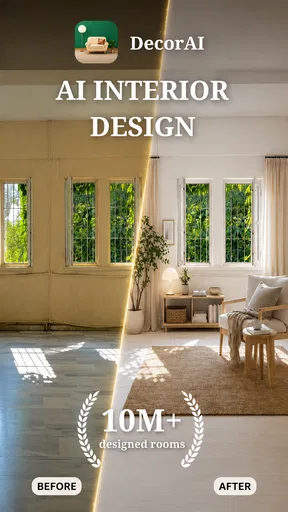
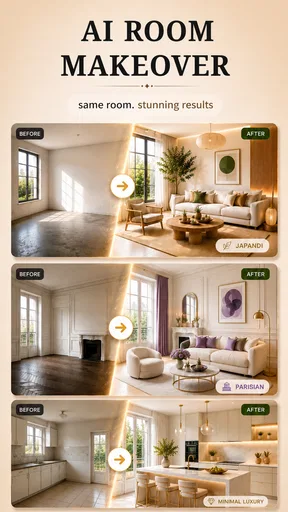
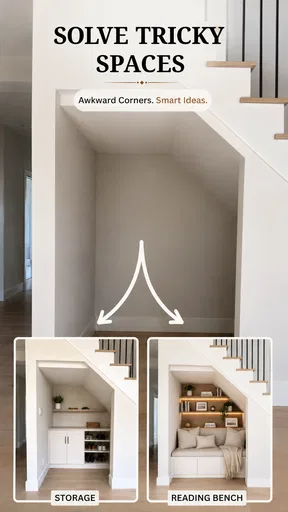
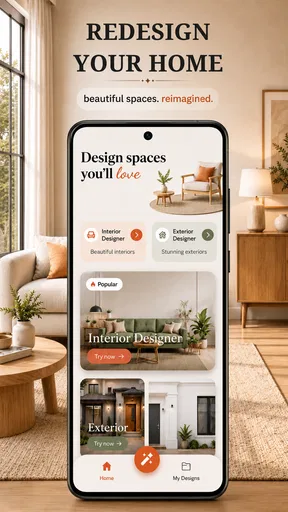
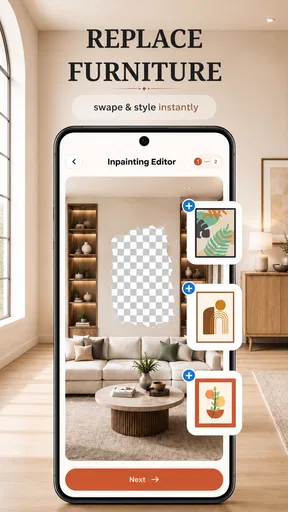
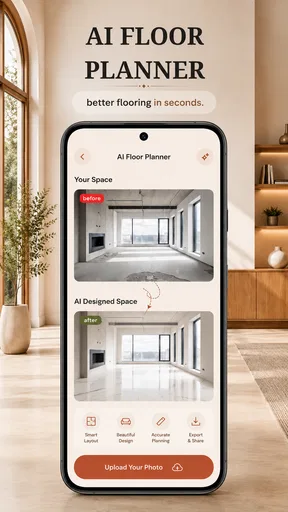
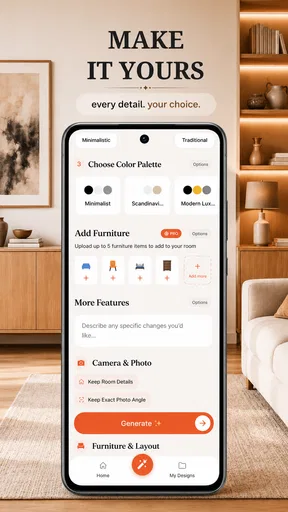
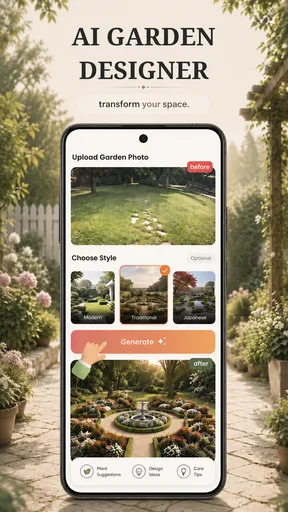
Our Review of Decor AI: AI Interior Design
 Analysis by Appyee
I like the idea of testing a room redesign before spending money or hauling furniture around, and that is the practical appeal of Decor AI: AI Interior Design. It is aimed at home decorating, with Rocket Digital Apps behind it, and its AI-led approach makes it feel more like a quick visual brainstorming tool than a traditional planning program. I’d consider it when I have a room that feels stuck and need a few directions to explore, rather than when I need a precise renovation plan.
The first-week appeal is easy to understand
The first session has a low barrier: start with a photo of a room, then use the app to explore a possible redesign. That makes the process approachable if you don’t know the names of furniture styles or how to build a color scheme from scratch. I can see the appeal for renters, first-time homeowners, or anyone trying to make one corner of a home feel more intentional.
The key is to treat a generated design as a prompt, not a finished specification. A visual can help me decide whether I want a calmer palette or a more dramatic look, but it doesn’t settle questions such as whether a sofa will fit through a doorway or whether a proposed arrangement leaves enough room to walk. I’d use the image to identify preferences, then check dimensions and practical constraints separately.
Useful for exploring ideas, not buying blindly
A realistic everyday use would be taking a photo of a living room after a small rearrangement hasn’t worked. I could try a different design direction, compare the mood with what I already own, and decide whether the problem is the room’s colors, furniture arrangement, or simply too much visual clutter. That can make a shopping trip more focused: instead of browsing for anything that looks attractive, I can look for pieces that support the direction I actually want.
There’s a helpful trade-off here. AI design can make it easier to imagine a room beyond its current state, but a polished-looking result may suggest changes that are expensive, unavailable, or unsuitable for daily life. Before buying anything, I’d write down what I want to keep, measure the available space, and look for real products that match the general idea. The app can help with taste; it should not be the final authority on fit or construction.
Where it sits beside familiar alternatives
Compared with browsing inspiration photos, a room-based AI tool has the advantage of starting from the space I’m trying to change. Generic room images can be beautiful but hard to translate to a home with different proportions, windows, or existing furniture. On the other hand, a conventional room planner is usually the better choice when I need exact measurements, a dependable floor plan, or a detailed placement check. Decor AI’s appeal is the early creative stage: generating possibilities before I commit to a more exact plan.
It also differs from asking a professional decorator for a considered plan. A person can account for priorities, habits, awkward corners, and budget in a conversation; an app is most useful when I already have a rough goal and want a fast way to test visual directions. If the room involves structural work, electrical changes, accessibility needs, or a large investment, I’d seek appropriate professional advice rather than rely on an AI image.
Small habits make the results more useful
For a more meaningful comparison, I’d take a clear photo from a consistent position and change one design intention at a time. If I switch the room’s style, palette, and furniture direction all at once, I may like the new image without knowing which change helped. Keeping the original photo handy also makes it easier to judge whether a generated look solves the problem or merely feels novel.
I’d also decide in advance what must stay: a favorite chair, a child’s play area, a desk, or a piece that cannot be replaced. That simple constraint gives the exercise a real-world purpose. Rather than asking only, “Does this look good?”, I can ask, “Could I keep the things I use every day and still move toward this look?” This is a useful way to turn an appealing concept into a more realistic shortlist of changes.
The app is free to download, while in-app purchases range from $5.99 to $74.99 per item. I’d explore what I can do before paying, then consider whether a paid option solves a specific need rather than buying because I’m caught up in an appealing mock-up. That matters especially if I’m only decorating one small space and may not return to the app often.
What is Decor AI?
Alright, let's kick things off with the basics. Decor AI: AI Interior Design is an innovative app that uses artificial intelligence to help users design and visualize interior spaces. Whether you're moving into a new place or just want to refresh your current setup, this app promises to make the process a breeze.
The app is available for both Android and iOS, so no matter what device you're rocking, you can join in on the fun. It's packed with features that allow you to explore different styles, play with color palettes, and even see how different furniture pieces would look in your room. It's like having a digital interior designer who never sleeps!
Features That Stand Out
Now, let's talk features. One of the most impressive aspects of Decor AI is its ability to use augmented reality (AR) to give you a sneak peek into how your room could look. You just point your phone at the space you want to transform, and boom! You get a real-time visualization of different design options. It's like magic!
Another cool feature is the app's extensive library of styles and furniture. Whether you're into minimalist vibes or love a bohemian flair, there's something for everyone. Plus, the app offers curated design templates that you can customize to your liking. It's like having a professional designer suggesting ideas tailored just for you.
Getting Started with Decor AI
Getting started with Decor AI is as easy as pie. Once you download the app, it walks you through a simple setup process. You'll start by snapping a few photos of your room. Don't worry, you don't need to be a pro photographer; the app is pretty forgiving.
Next, you'll choose from a variety of styles and customize elements like furniture, colors, and layout. The app's AI does most of the heavy lifting, suggesting changes based on your preferences. It's a bit like having a conversation with your space, figuring out what it needs to really shine.
Why You'll Love It
So, why should you give Decor AI a shot? For starters, it's perfect for those of us who might feel a bit lost when it comes to decorating. The app's intuitive design and user-friendly interface make it easy to experiment without feeling overwhelmed.
Plus, the AR feature is a game-changer. Being able to see potential changes in real-time helps eliminate the guesswork. You can try out that bold wallpaper or funky sofa without the commitment. It's a safe space for creativity!
Making room for repeat use
The long-term value depends on whether I have a reason to revisit my ideas. A one-off refresh may give me what I need in a weekend, while a move, a new roommate, or a changing work-from-home setup can create fresh design questions. I’d save the strongest concepts and return when something in the room changes, rather than opening the app out of habit without a project in mind.
There is also a useful way to avoid design fatigue: make a short list of decisions the image should help with, such as whether a lighter look feels right or whether a reading area belongs by the window. Once I have an answer, I can stop generating variations and move to practical steps. Endless experimentation can make a room feel harder to finish, not easier.
Who should skip it? Anyone who needs accurate construction drawings, verified product availability, or a guaranteed match between a visualization and the finished room will be better served by measured planning and hands-on advice. It may also be unnecessary if you already know exactly what you want and only need a list of items to buy. Its sweet spot is uncertainty about the look, not technical execution.
Final Thoughts
In a nutshell, Decor AI: AI Interior Design is a fantastic tool for anyone looking to spruce up their living space. It's like having a personal designer who understands your style and helps bring your vision to life. With its AR capabilities, diverse design options, and user-friendly interface, it's definitely worth a download.
Whether you're planning a complete overhaul or just want to add a few new touches, Decor AI makes the process fun and stress-free. So, go ahead, unleash your inner designer, and see where your creativity takes you. Happy decorating!
My long-term verdict
Decor AI is most convincing when I use it to get past a blank-page problem: I have a room, a rough intention, and no clear idea what to try first. It can make that first burst of exploration feel manageable. Its recurring value is less certain for someone who rarely changes their home, so I’d judge it by whether the concepts lead to decisions I can actually use, not by how many attractive alternatives I can produce.
The app is rated 4.6 on average from around 1,500 ratings, and it has over 10,000 installs. It is free to download, is rated for Everyone, and its current version is 3.2.9, with Android 7.0 as the minimum OS. Those details make it easy to consider trying, but they don’t change the practical test: can a visual suggestion help me make a better choice for my own room? I’d recommend it as a starting point for creative exploration, while keeping measurements, budget, and real-life comfort in charge of the final decision.
Verdict
Strengths of Decor AI: AI Interior Design
- User-friendly interface for easy navigation.
- Wide variety of design styles available.
- AI provides personalized design suggestions.
- Quick rendering of design concepts.
- Supports saving and sharing designs easily.
Limitations of Decor AI: AI Interior Design
- Limited free features, many locked under premium.
- Requires stable internet connection.
- Occasional delay in AI response.
- Some design options lack customization.
- In-app ads can be distracting.
Similar Picks in This Category
View All
Universal TV Remote Control
CodeMatics Media Solutions3.9

AlfredCamera Home Security app
Alfred Systems Inc.4.7

Planner 5D: AI Home Design
Planner 5D4.5

Universal Tv Remote-Cast to TV
One Music Player4.1

Zillow: Homes for Sale & Rent
Zillow Group4.8

99acres Buy/Rent/Sell Property
infoedge.com4.3
Frequently Asked Questions
What is Decor AI: AI Interior Design?
Decor AI: AI Interior Design is an innovative application that leverages artificial intelligence to assist users in designing and visualizing interior spaces. By inputting room dimensions and preferences, the app generates personalized design ideas and suggestions, making it easier for users to plan and execute their home decor projects.
How does the AI feature work in Decor AI?
The AI in Decor AI analyzes user inputs such as room dimensions, style preferences, and color schemes. It then generates design recommendations and visualizations tailored to the user's specifications. This technology helps streamline the design process by providing creative ideas and practical solutions that match the user’s requirements.
Is Decor AI suitable for professional designers?
Yes, Decor AI is beneficial for both amateurs and professional designers. Professionals can use the app to quickly generate design concepts and visualizations, which can be refined further. The app's AI-driven suggestions can serve as a starting point for more detailed and customized designs, making it a versatile tool in a designer's toolkit.
What are the device requirements for using Decor AI?
Decor AI is available for both Android and iOS devices. It requires a modern operating system and a stable internet connection for optimal performance. Users should ensure their devices have sufficient storage and processing power to handle the app's features, including high-resolution visualizations and AI computations.
Are there any costs associated with using Decor AI?
Decor AI offers a free version with basic functionalities. However, to access premium features such as advanced design options and exclusive content, users may need to purchase a subscription. The app may also offer in-app purchases for specific design elements or additional resources.
